 ×
Home > News&Video > News
In the display industry, one of the most common first questions is a simple one: a screen is just a panel that shows images, so why does it need a board at all?
The answer comes down to one thing:screens and signal sources speak two different languages.
A liquid crystal panel only understands its own set of interface signals — LVDS, eDP, MIPI, RGB, and so on. Meanwhile, the customer's PC, game console, set-top box, or industrial host outputs standard HDMI signals. The two cannot communicate directly.
An HDMI board is exactly the "translator" and "control center" in between.
It translates the HDMI signal coming from the source into the "dialect" the screen understands, while also supplying the power and control the screen needs to operate. In the industry, it is also commonly called adriver board, controller board, or signal adapter board — different names, but all referring to the same class of product: the component that turns a "bare panel" into a complete device capable of accepting HDMI directly and displaying images.
The value of an HDMI board goes far beyond "interface conversion." It is effectively a complete system built around one goal — making the screen work. Its core capabilities cover five areas.
This is the most fundamental and most important function. An HDMI board converts the incoming standard HDMI digital signal into the dedicated interface signals the screen can recognize — LVDS, eDP, MIPI, and others. Because different screens use different protocols, the driver board is often tailored to the specific screen.
It provides a stable power supply for the entire display system. The driver board itself typically requires 12V input, and it must also generate and manage the various voltages needed by the backlight module and logic board — low voltages such as 3.3V and 5V, as well as backlight high voltages that may exceed 20V.
It processes and decodes the digital audio and video data carried over HDMI, and performs timing adjustment so that the output precisely matches the screen's native resolution, refresh rate, and other parameters.
It is normally paired with a remote control or onboard buttons, allowing users to adjust brightness, contrast, color, volume, and other settings. Without this board, none of the screen's parameters could be adjusted.
It separates the audio from the HDMI signal and plays it through the onboard speaker connector or a 3.5mm audio output jack, delivering a synchronized audio-video experience over a single cable.
We are committed to providing flexible, reliable display driver solutions.
· Coverage from 0.96" to 32"
· Options for standard screens, touch-enabled screens, and screens with driver boards
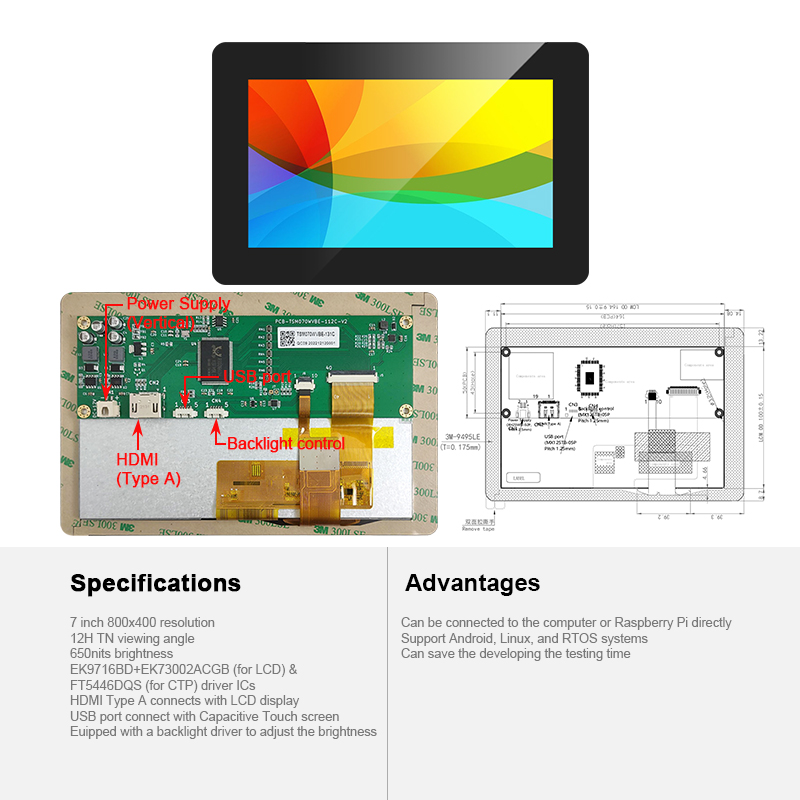
7-Inch HDMI Touch Display Module
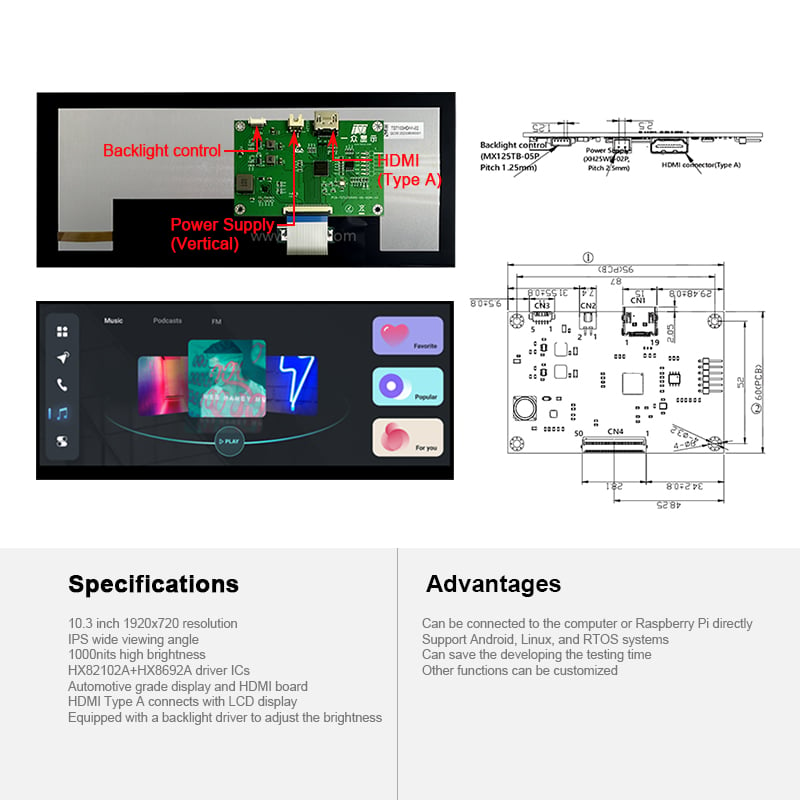
10.3-Inch Automotive-Grade HDMI Display
Beyond HDMI, we also support DP, VGA, DVI, Type-C, USB, serial (UART), IIC, and other input/output interfaces, which can be flexibly combined to match the customer's overall system design.
Our HDMI board solutions are deployed across charging stations, industrial control, smart home, defense, IoT, automotive computers and marine instrumentation displays.
It is important to note that HDMI driver boards — especially HDMI-to-MIPI solutions — are generally not off-the-shelf items. They must be confirmed according to each customer's specific requirements and the specific screen involved. Different panel makers and models may differ in resolution, interface type, pin definitions, and timing parameters, so a "one screen, one solution" approach is the industry norm.
To make the process as efficient as possible, we recommend a three-step approach:
The three most critical items are: resolution, interface type (e.g., MIPI / RGB / LVDS / eDP), and pin count.
Clarify "where the signal comes from and where it needs to go":
· Source side: What signal does the host system output? (HDMI / DP / VGA / Type-C …)
· Screen side: What interface does the screen require? (MIPI / RGB / LVDS / eDP …)
· Additional needs: Is touch functionality required? Is audio output needed? Are there special requirements for refresh rate or brightness?
Our engineering team evaluates feasibility and confirms the solution, then arranges prototyping. Once validated, the design moves into mass production.
Our HDMI boards can be connected directly to a PC or Raspberry Pi — no additional adapter or driver development required.
They support Android, Linux, and RTOS systems, covering the most common development environments.
By eliminating the need to build a driver board from scratch, our solutions can save significant development and testing time.
Additional functions can be customized to meet specific project requirements.
If you are selecting a display solution, or already have a screen that needs a matching HDMI driver board, we welcome you to reach out.
Please have your screen model, datasheet, or photos ready, and we will evaluate a solution for you right away.
Team Source Display — Focused on display driver solutions. Helping every screen perform at its best.
Technical content in this article is compiled from publicly available industry technical materials. Specific product specifications are subject to the actual datasheet.

 EN




 Hot News